
TL;DR
Pedra now lets you empty 360° virtual tour images directly in the platform. Remove furniture while preserving walls, floors, and lighting—the empty version is automatically added to your virtual tour, and visitors can seamlessly switch between the furnished and empty views. No reshooting, no Photoshop, no manual editing.
The Problem: You're Stuck With Furnished 360° Photos
Until now, Pedra let you empty regular property photos in seconds.
But 360° virtual tour images? You were stuck with them.
If your property had furniture, it stayed in the photo. You could edit normal images—crop them, enhance them, remove objects—but panoramic 360° photos were off-limits. No empty virtual tours. No clean developer presentation. No way to show the space without the staging.
The result: You had to choose:
- Keep the furnished version (not ideal for developers or obra nueva listings)
- Reshoot the property with an empty space (expensive and time-consuming)
- Manually edit in Photoshop (hours of work per image)
- Use a separate tool (context-switching, extra costs)
For real estate professionals using 360° virtual tours, this was a real bottleneck.
What We Shipped: Empty 360° Images, Instantly
That changes today.
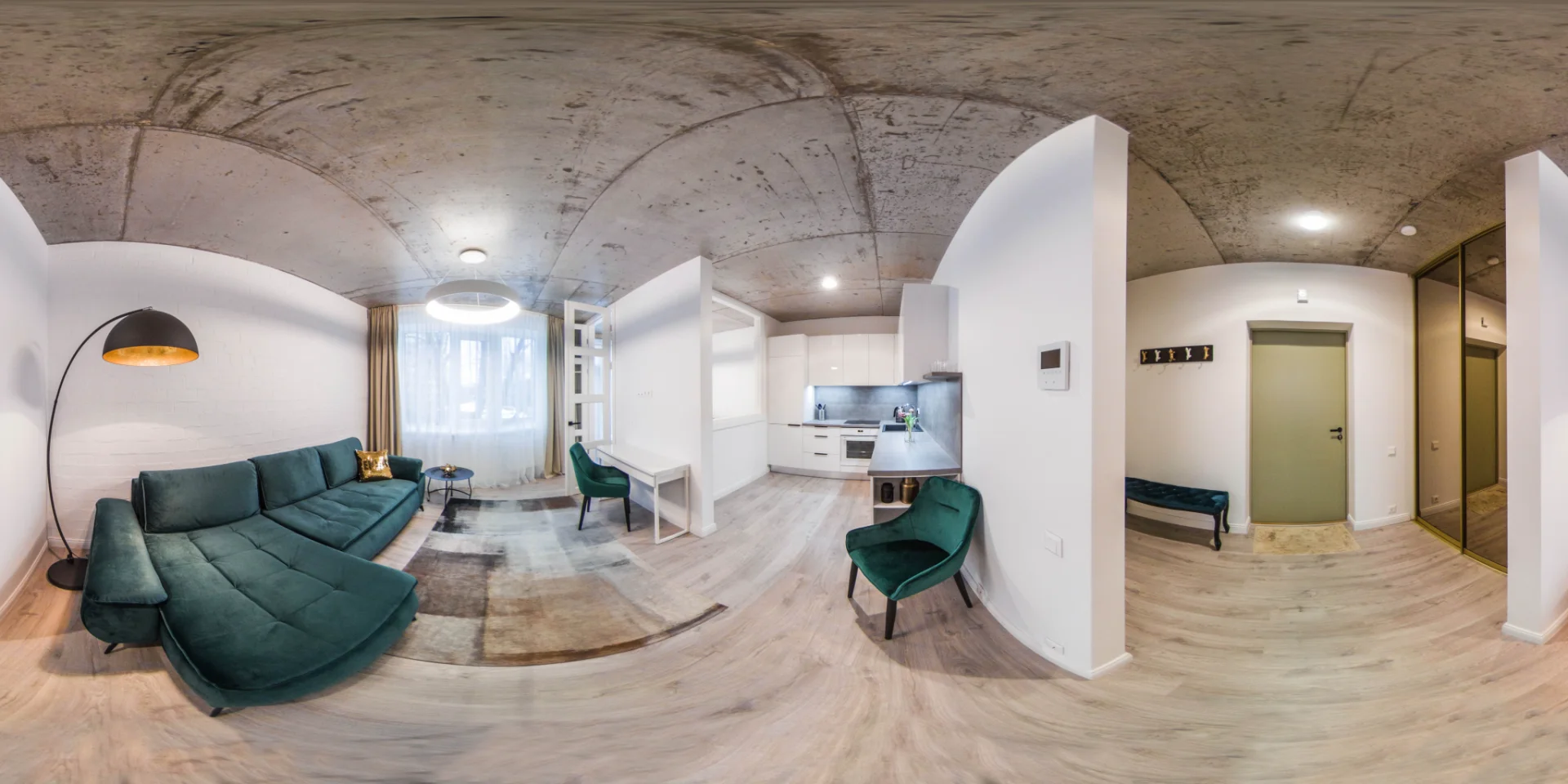
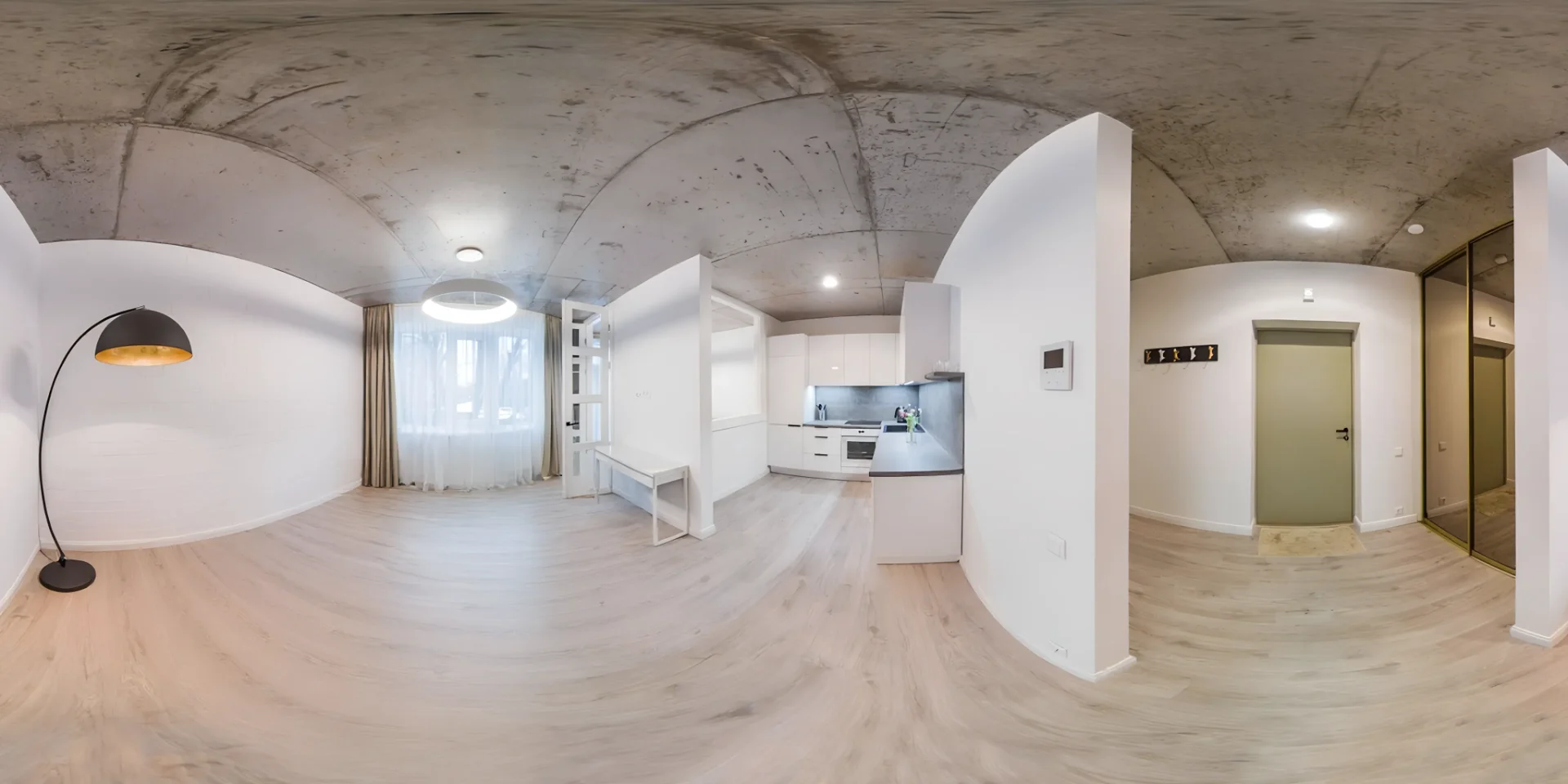
You can now empty 360° images directly in Pedra—and use them inside your virtual tours.
Here's how it works:
- Upload your 360° photo to Pedra (or use one already in your virtual tour)
- Click "Empty" on the image
- Pedra removes the furniture while preserving architecture (walls, floors, lighting, details)
- The empty version is automatically added to your tour—visitors can switch between furnished and empty seamlessly
That's it. Same panoramic image, two versions. No reshooting. No external tools. No manual editing.
Why This Matters: Full Control Over How Your Property Is Presented
Now you can do things that weren't possible before:
Show Empty Virtual Tours
Present the property in its raw, unfurnished state—ideal for buyers who want to visualize their own furniture and décor.
Switch Between Furnished and Empty Seamlessly
Once you empty an image, both versions live in the same tour. Visitors can switch between them instantly—no separate links, no separate tours.
- Furnished view → appeals to lifestyle buyers
- Empty view → appeals to developers and investors
All from the same 360° photos. One tour, two experiences.
Adapt to Developer and Obra Nueva Listings
Developers and new construction projects require empty, clean presentations. Now you can deliver that without reshooting or hiring a photographer.
Increase Buyer Transparency
Buyers trust what they see. Showing both furnished and empty versions builds confidence and reduces surprises during viewings.
Save Time and Money
No photographer callbacks. No reshoot budgets. No hours in Photoshop. Just click, remove, and publish.
How It Works: AI That Understands Architecture
Pedra's furniture removal isn't just basic object detection. It's architecture-aware AI inpainting.
Here's what that means:
The AI understands context. It doesn't just blur or clone nearby pixels. It analyzes the room's geometry, lighting, and architectural features—walls, floors, ceilings, windows, doors—and intelligently fills in the space where furniture was.
It preserves what matters. Walls stay walls. Floors stay floors. Natural light and shadows are maintained. The result looks like the room was actually photographed empty, not like something was crudely removed.
It works on panoramic images. Unlike standard object removal tools, Pedra handles the unique challenges of 360° photos: curved perspectives, edge distortion, and the complexity of removing objects across a full panoramic view.
It's fast. Most images process in seconds. You're not waiting for batch processing or manual review.
Real-World Use Cases
Real Estate Agents
Show buyers multiple versions of the same property. Use the empty version for open houses and initial listings, then switch to the furnished version to highlight staging potential.
Property Developers
Present new construction projects with clean, professional empty virtual tours. No furniture distractions. Buyers focus on the space itself.
Property Managers
Create virtual tours for vacant units that look move-in ready. Show the space's potential without staging costs.
Virtual Tour Creators
Offer clients more flexibility. Deliver both furnished and empty versions from a single shoot. Increase your service value without additional shoots.
Real Estate Marketing Teams
Build comprehensive virtual tour libraries with multiple versions. Use A/B testing to see which version converts better for different buyer segments.
How Pedra's Furniture Removal Compares
| Approach | Time | Cost | Quality | Flexibility |
|---|---|---|---|---|
| Photoshop/Manual Editing | 30–60 min per image | High (your time) | Variable | Full control, but slow |
| Reshooting with Empty Space | 1–2 hours + scheduling | Very high | Perfect | Requires property access |
| Generic Object Removal Tools | 5–10 min per image | Low–Medium | Poor on 360° | Limited to basic removal |
| Pedra's AI Furniture Removal | 30 seconds | Included in subscription | Professional | Fast, repeatable, scalable |
The difference: Pedra is built for real estate professionals. It understands 360° panoramic images, preserves architectural details, and integrates directly into your virtual tour workflow.
Getting Started: Try It Free
Ready to create empty 360° virtual tours?
Start your free trial at Pedra and try furniture removal on your own 360° images. No credit card required.
Learn more about Pedra's full tour capabilities on our Virtual Tours page.
FAQ
Can Pedra remove all types of furniture? Yes. Pedra's AI handles sofas, beds, tables, chairs, decorations, and most household items. If the furniture is visible in the 360° image, it can be removed. For unusual or partially visible items, results may vary—but the AI is trained on thousands of real estate photos.
Does it work on all 360° photo formats? Pedra supports standard equirectangular 360° panoramic images (the most common format). If you're unsure about your format, upload a test image and see the results. Most 360° cameras and smartphone apps produce compatible formats.
How long does furniture removal take? Most images process in 30 seconds to 2 minutes, depending on image resolution and complexity. You'll see a preview before the final version is saved.
Can I undo the removal if I don't like the result? Yes. Pedra keeps the original image intact. You can revert to the furnished version or try the removal again with different settings.
Do I need to remove furniture from every 360° image in my virtual tour? No. You decide which images to empty. Many agents keep some furnished and empty some—it depends on your strategy and the property type.
Can I switch between furnished and empty in the same virtual tour? Yes—and it happens automatically. Once you empty an image, the empty version is added to your existing tour. Visitors can switch between the furnished and empty views directly inside the tour, with no separate links or duplicate tours needed.
Is this included in my Pedra subscription? Furniture removal for 360° images uses credits, just like other Pedra features. Check your plan to see how many credits you have available.
What if the AI removes something I wanted to keep? You can manually touch up the image in Pedra's editor, or try the removal again. If you need more control, you can also export the image and edit it in Photoshop.
Does this work for regular (non-360°) photos too? Yes. Pedra's furniture removal works on standard photos as well. But this feature is especially powerful for 360° images, where manual editing is much harder.
Can I use these images for commercial purposes? Yes. Any images you create in Pedra are yours to use commercially. Use them in listings, marketing, social media—however you need.