
An AI avatar for real estate agents is a realistic, AI-generated version of you that presents your listings on video, made from one photo of you and the listing photos, so you never have to film. The best ones put the avatar inside the property's own rooms and make it speak in your cloned voice, so the result looks like a normal agent-presented listing video.
I made this guide after making one myself. The video below opens on me presenting a flat in La Castellana, Madrid. I didn't film it. I went to the viewing alone, and I'm still the one presenting the property.
Below: what an AI avatar actually is, why agents use one, how it is made, a step-by-step, the tips that make it look real, what it costs, and when you should still film yourself.
What is an AI avatar for real estate?
An AI avatar is a digital version of a person that looks and talks like them on video. In real estate there are two kinds, and most articles mix them up:
- A talking head over a background. You record yourself once, the tool learns your face and voice, and it makes videos of you speaking to camera in front of a backdrop or a listing photo. Good for market updates and personal branding. Tools: HeyGen, Synthesia.
- A presenter inside the listing. The avatar is placed in the actual rooms of the property, standing on the floor of the living room or the kitchen, and presents it while the video moves through the flat. Good for the listing video itself. This is what Pedra's Presenter does.
The difference matters. A talking head in front of a photo is an agent talking about a flat. A presenter in the room is an agent showing it, which is the format that gets watched.
Why agents use an AI avatar
Videos where the agent presents the property are everywhere on Instagram and TikTok. They build trust, they feel personal and they get views, because people buy from people.
Most agents still don't make them, for three reasons:
- You go to the shoot alone. There is nobody to hold the camera.
- You don't like being on camera, or you don't have time to do ten takes per listing.
- Filming every listing doesn't scale. A videographer charges per shoot, and you have more listings than shoots.
An AI avatar removes the camera from that list. You keep the format that works, the agent presenting the property, without the filming.
How an AI avatar listing video is made
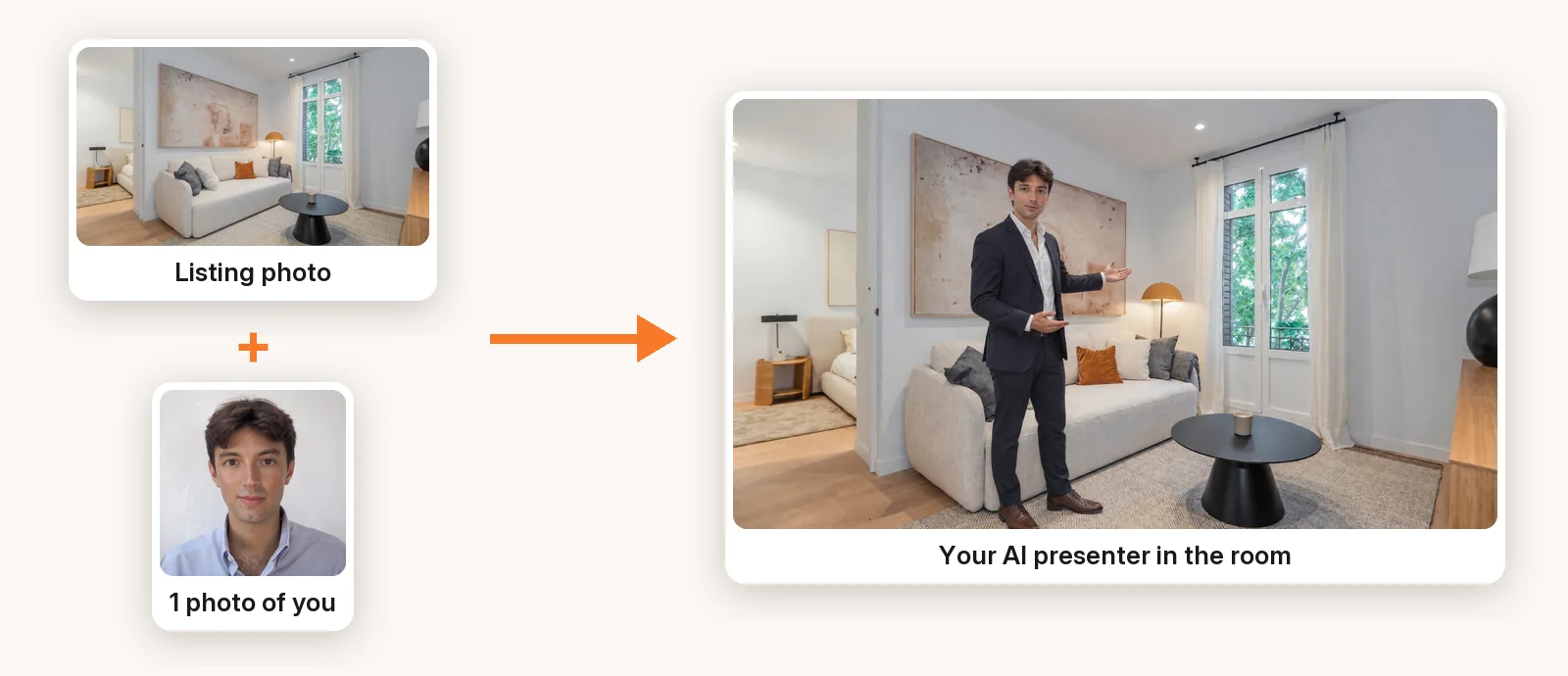
Under the hood, Pedra's Presenter does four things for each scene you choose:
- Places you in the room. It takes the listing photo and your photo and creates a still of you standing in that room, on free floor space, without moving or redrawing the furniture.
- Animates you talking. It turns that still into a short clip (4, 6 or 8 seconds) of you looking at the camera, gesturing and saying the scene's voiceover line.
- Keeps your face. A face-locking step keeps the face consistent with your photo, so the avatar still looks like you while it talks.
- Uses your voice. The line is spoken in your cloned voice, with subtitles, and the clip is cut into the rest of the listing video.
The rest of the video (the other rooms, the camera motion, the music) is made from the listing photos as usual, in 16:9 and 9:16 at the same time.
How to make an AI avatar video in Pedra (step by step)
1. Create the video from the listing photos
Open the property in Pedra, click Create video, upload the listing photos, select them and click Next. Phone photos are fine.
2. Pick the scenes where you appear
On the scene you want, click Edit, then Presenter. The panel is called Who presents?: the presenter stands in the room and says that scene's voiceover line to camera. Choose your own photo (your branding photo, or upload a new one) or one of the 9 AI presenters, and click Confirm.
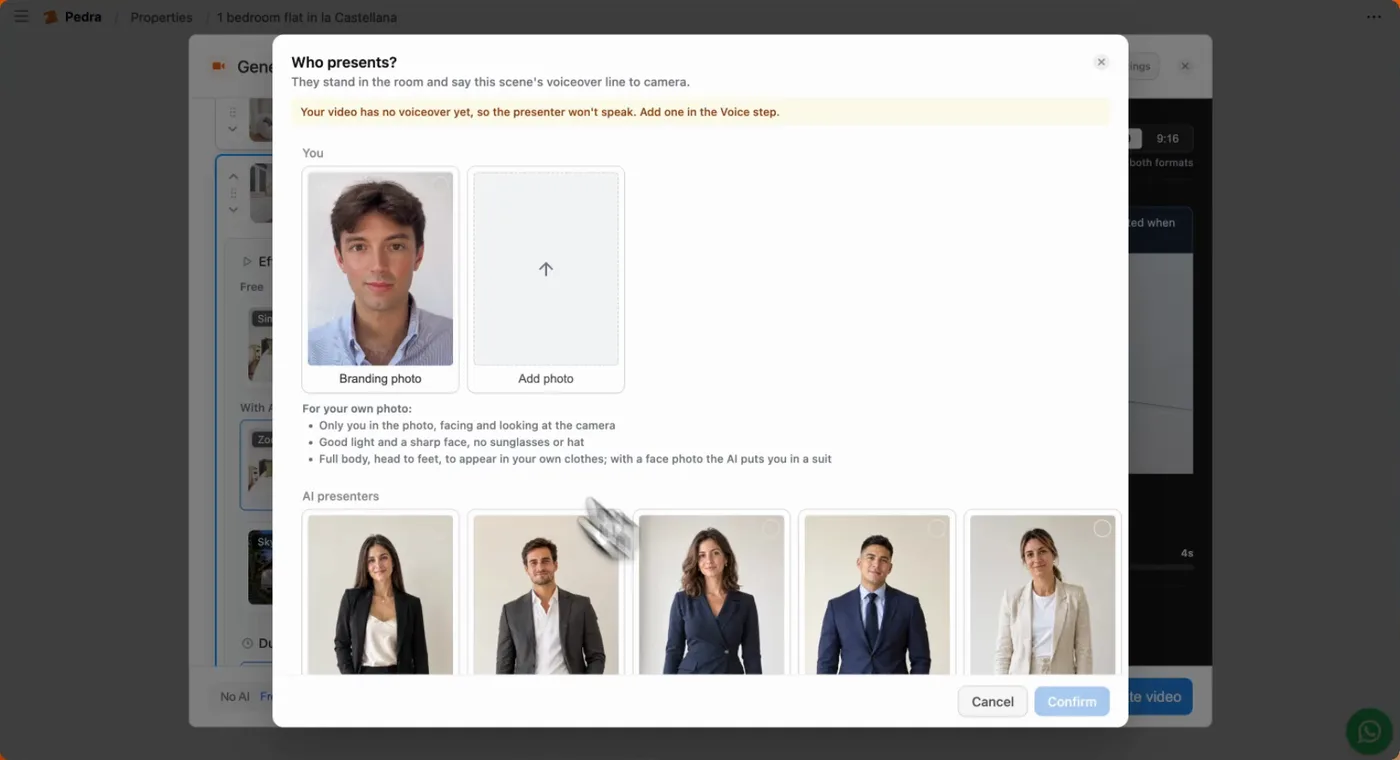
The first scene is the hook, so that is the best place for you. In the video above, I'm in the first two scenes.
3. Add your voice
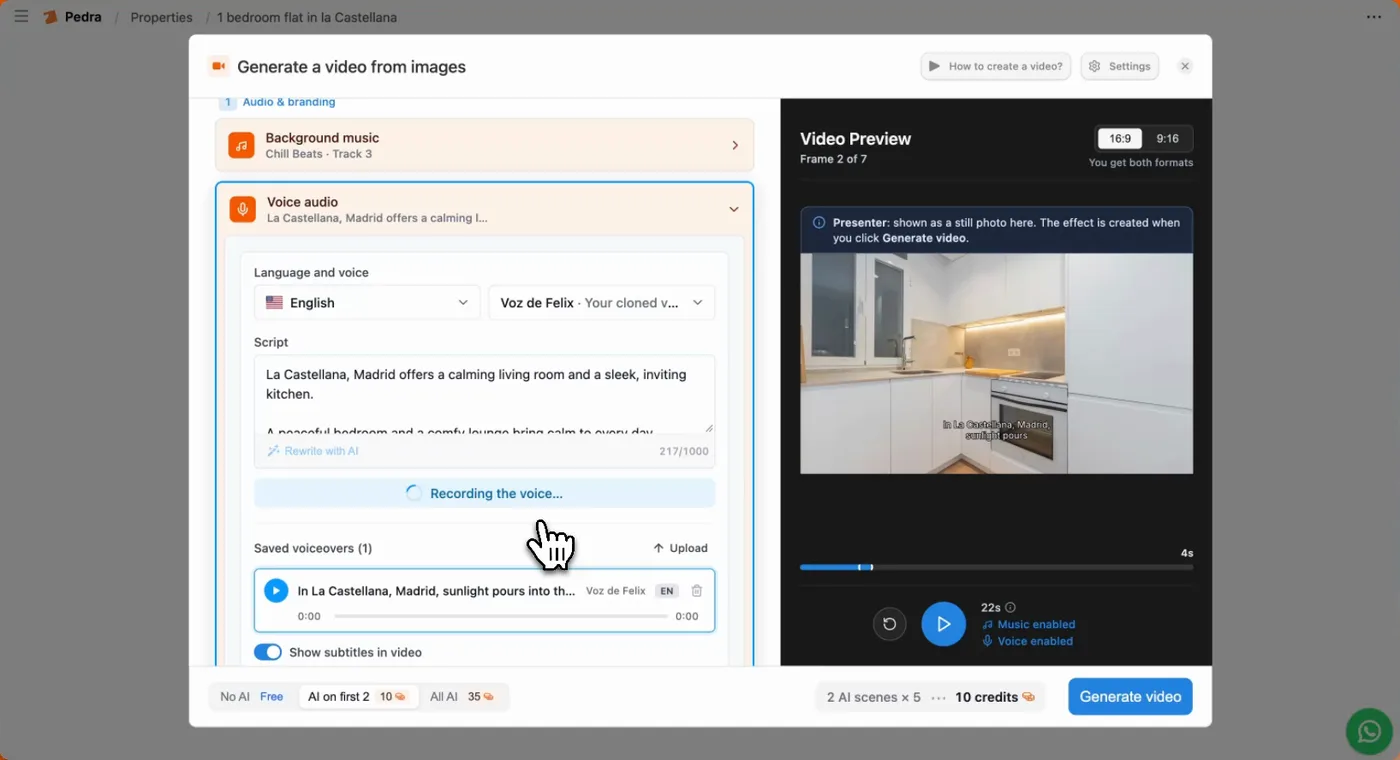
In Voice audio, pick the language and your cloned voice, then click Rewrite with AI. Pedra writes the script from the listing, generates the audio in your voice and adds subtitles. If you haven't cloned your voice yet, you can do it right there, once, and reuse it in every video.
4. Generate
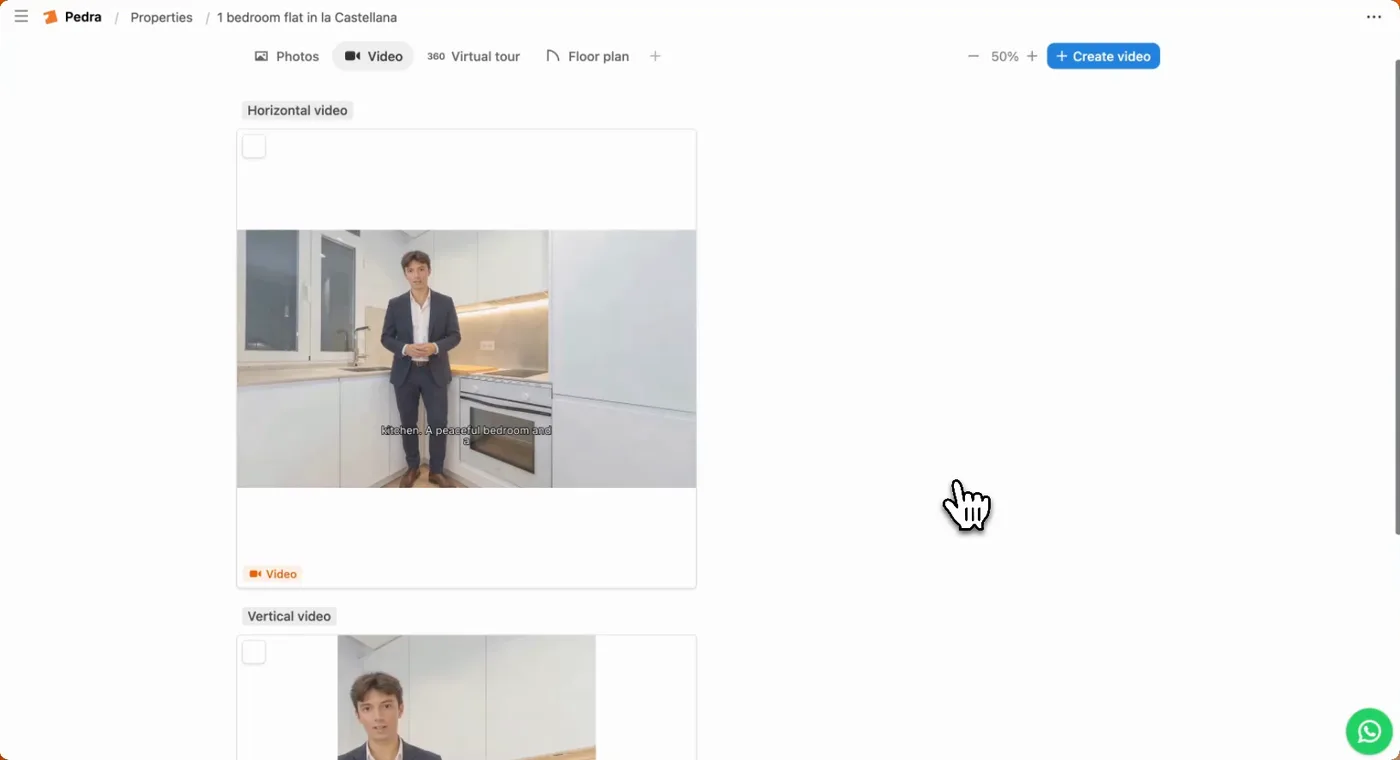
Click Generate video. A few minutes later you get the horizontal and the vertical version, with you presenting the rooms you chose.
Tips for an AI avatar that looks real
These come straight from what works and what breaks:
- Use the right photo. Only you in it, facing and looking at the camera, good light, a sharp face, no sunglasses or hat.
- Full body keeps your clothes. With a head-to-feet photo, the avatar wears what you wore. With a face-only photo, the AI dresses you in a suit.
- Pick rooms with open floor. The presenter needs somewhere to stand. Living rooms and kitchens work best; a small bathroom or a hallway full of doors does not.
- Keep each line short. A clip lasts 4 to 8 seconds, so one sentence per scene. "Light from both sides, and a kitchen you can cook in" beats a paragraph.
- Use it where it earns its place. One or two presenter scenes, ideally the first, then let the property carry the rest. A presenter in every room gets repetitive.
- Don't smile harder than your photo. The avatar keeps your expression from the photo. A neutral, friendly photo reads more natural than a big grin.
What an AI avatar costs
In Pedra each scene with a presenter costs 5 credits, whatever the clip length. Scenes without AI effects are free. In the example above, the credit counter shows 2 AI scenes × 5 = 10 credits for the whole video.
On the Pro plan, 100 credits cost 29 euros a month, so one presenter clip is about 1.45 euros. A month of 10 listing videos with you in the first scene is 50 credits.
For comparison, talking-head avatar tools such as HeyGen start at around $29 a month, but they make the presenter video only, not the listing video, so you still need a second tool for the property.
AI avatar vs filming yourself
| Film yourself | Talking-head avatar (HeyGen, Synthesia) | AI presenter in the listing (Pedra) | |
|---|---|---|---|
| Camera or second person needed | Yes | Once, to train it | No |
| Shows the actual property | Yes | Usually a photo behind you | Yes, you stand in its rooms |
| Time per listing | An hour or more | Minutes | Minutes |
| Looks like you | Fully | Yes | Yes, from one photo |
| Best for | Signature listings, open houses | Market updates, personal brand | Every listing video |
AI avatars don't replace you. For a signature listing, a real walkthrough with you in it is still the strongest video you can make. As Ryan Serhant put it to HousingWire, the avatar carries your knowledge, but the agent behind it is still the point. The avatar is for the other twenty listings you would otherwise never make a video of.
Is it OK to use an AI avatar? Disclosure
Yes, with one rule: be open about it. Viewers don't mind an AI avatar; they mind feeling tricked.
- Say it in the caption. A short line like "presented by my AI avatar" is enough.
- In the EU it's a legal requirement. The AI Act's transparency rules require AI-generated video that shows a real person to be labelled as such.
- The property must still be the property. The avatar can present the flat; it must not change it. The same rule that applies to virtual staging applies here.
Try it
Make your first AI avatar listing video in Pedra: open a property, click Create video and pick Presenter on the first scene. The release notes have the short version, and if you are still choosing a video tool, our comparison of AI video tools for real estate covers the rest of the market.
