
To make a listing look luxury, you don't need a luxury property or a photographer. You need four things in the listing: no clutter, one styled room, bright light with straight lines, and a video. Most ordinary listings miss all four. With Pedra you can fix all four from the photos you already took on your phone, in about 15 minutes per property.
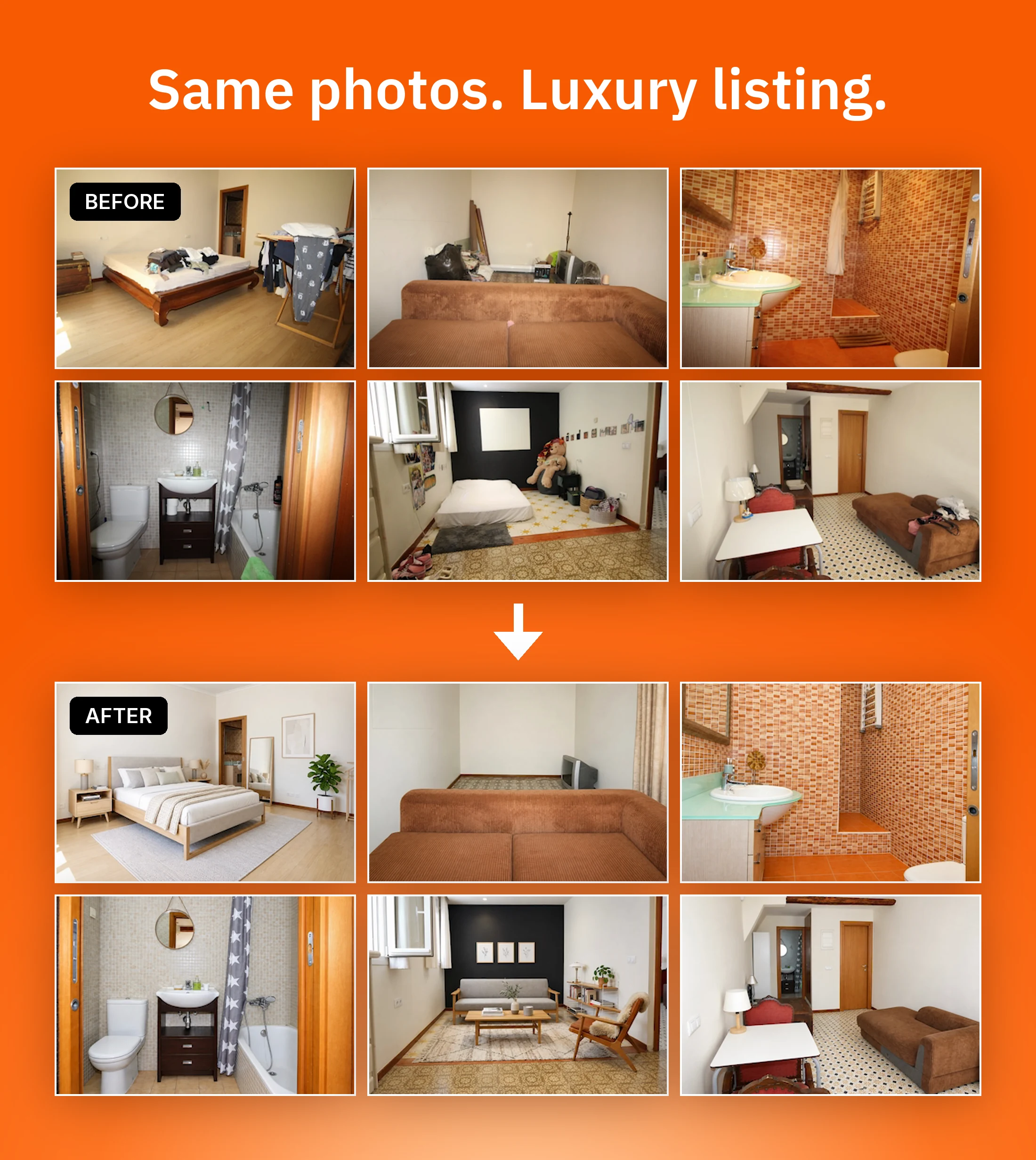
This guide walks through the exact steps, with the before and after of a real apartment in Barcelona shot on a phone.
The short answer: 4 steps
- Remove the clutter. Select all the photos, then Edit with AI → Remove Object → Generate Image.
- Style one key room. Edit with AI → Furnish → pick the space type and a style such as Scandinavian.
- Fix light and perspective on every photo. Filter Selection → Latest Version of each photo → Edit with AI → Enhance and Fix Perspective.
- Turn the photos into a video. Select the latest version of each photo → Create Video.
The result is ready to publish on Zillow, ImmoScout24, Idealista or any other portal.
Why a listing looks luxury
Luxury listings don't look expensive because of the property. They look expensive because of how they are presented. Put the same apartment in front of a buyer twice - once with dark, tilted, cluttered photos and once with clean, bright, straight ones and a video - and it reads as two different price brackets.
That matters on both sides of your business:
- Buyers see a better listing and ask to visit. A stronger presentation also gives you room to hold the asking price in a negotiation.
- Owners deciding which agent to list with compare how you present their property. A listing that looks professional wins you the next mandate, and the referrals after it.
If you are working on a genuinely high-end property, our list of luxury real estate marketing ideas covers the channels. This guide is about the opposite case: making an ordinary listing look like one.
Step 1: Remove the clutter
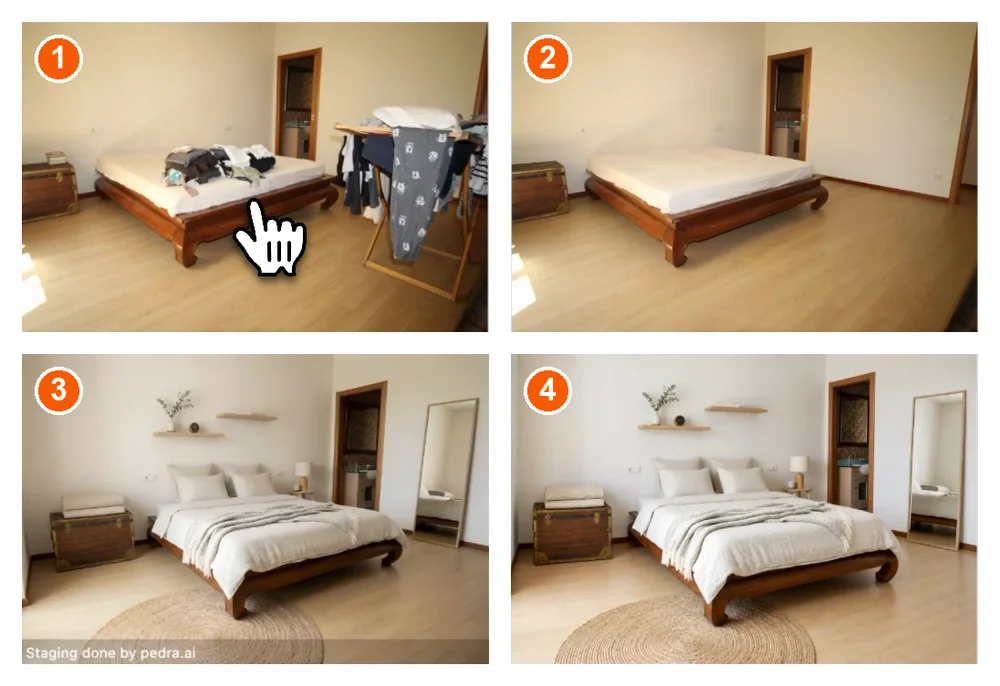
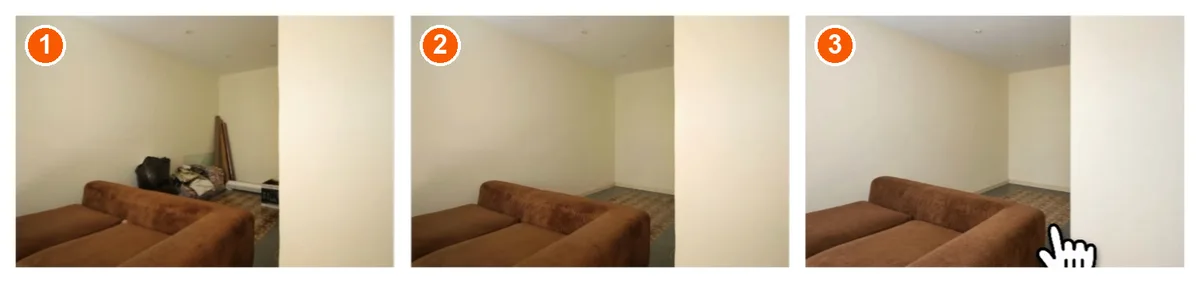
Start with what shouldn't be in the frame: trash bins, cables, fridge magnets, clothes, personal items. Fewer objects make a space look bigger, and bigger reads as more expensive.
In Pedra:
- Upload the listing photos and select all of them.
- Click Edit with AI, then Remove Object.
- Click Generate Image.
Pedra processes all the selected photos at the same time, at roughly 45 seconds per photo. You don't have to mark each object by hand. For what to clear before the shoot itself, see our guide on how to declutter a house for sale.
Step 2: Style one key room
You don't need to stage the whole property. Pick the room buyers look at first - usually the living room or the main bedroom - and furnish only that one or two.
In Pedra:
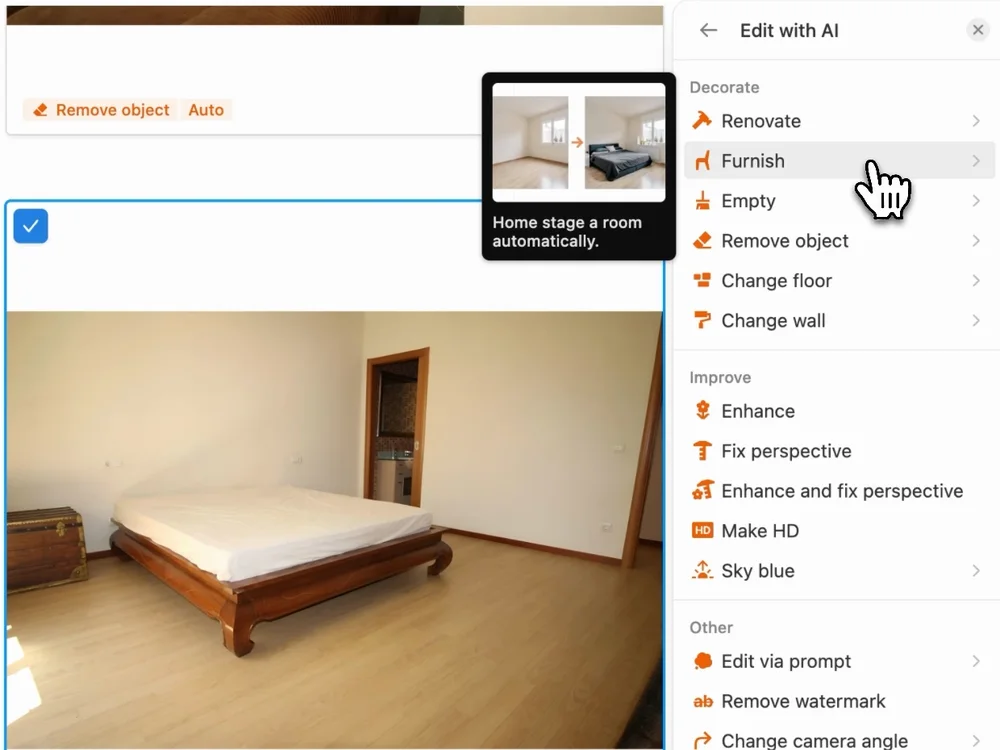
- Select the photo and click Edit with AI → Furnish.
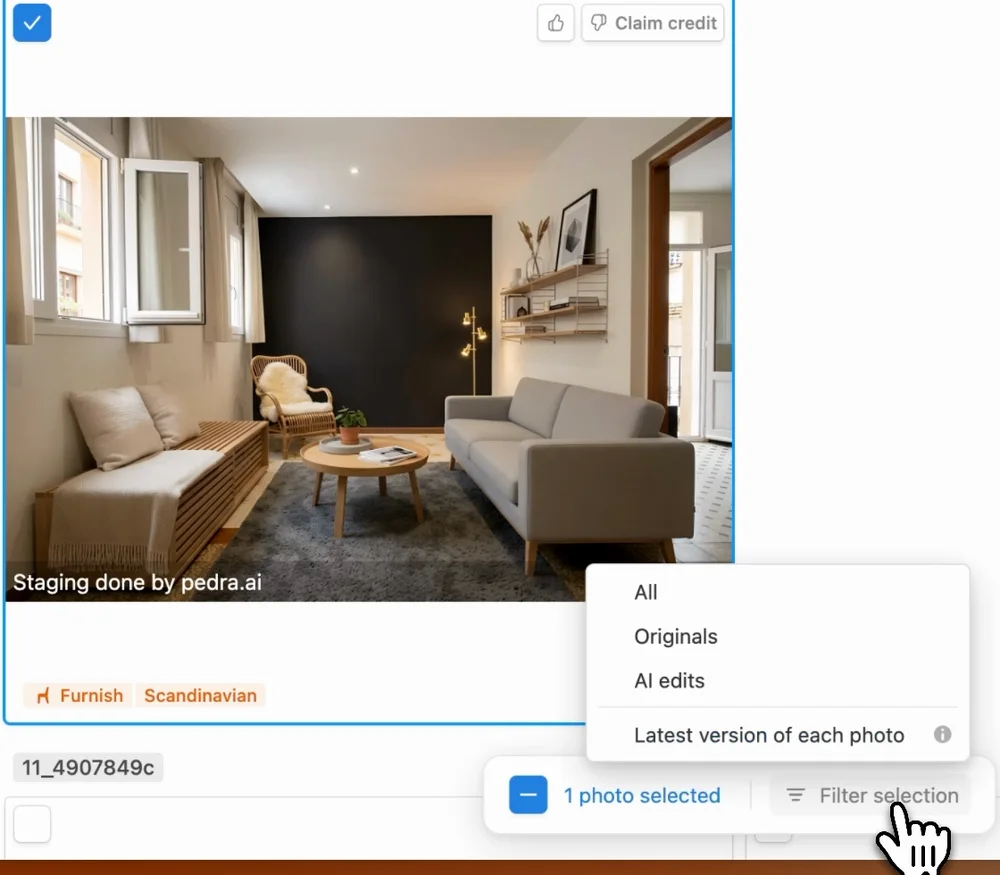
- Choose the space type (Bedroom, Living Room...) and a style. Scandinavian or minimalist suit most listings.
- Click Generate Image. It takes about 30 seconds.
The room, the walls and the architecture stay the same. Only the furniture changes, and what you are selling is the property, not the furniture.
One tip: label the photo as virtually staged. Pedra can add a caption such as "Staging done by pedra.ai" on the image, and you can change the text and the size. It builds trust with buyers and avoids surprises at the visit. More examples in our virtual staging before and after gallery.
Step 3: Fix the light and straighten every photo
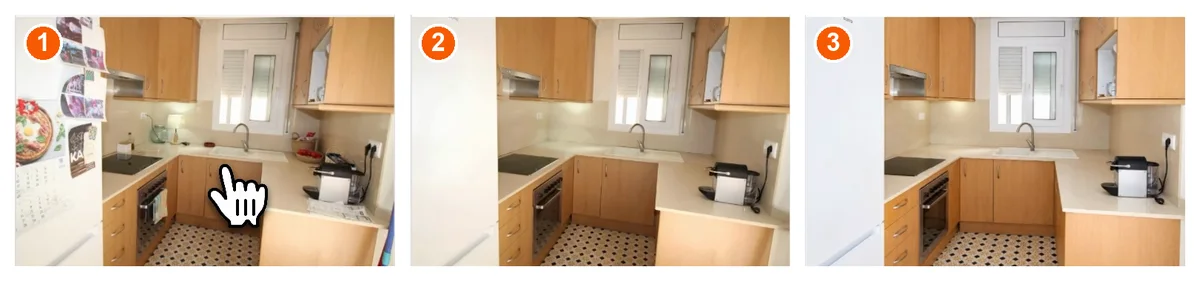
Phone photos come out dark, with a colour cast, and with walls that lean. This is the step that makes them look like a photographer took them - and it has to be done on every photo, so the whole listing has the same look.
In Pedra:
- Click Filter Selection → Latest Version of each photo. This selects the most recent edit of every photo, so you keep the decluttering and staging you already did.
- Click Edit with AI → Enhance and Fix Perspective.
It takes about 15 seconds per photo. Pedra corrects the light, colour, white balance and sharpness, and straightens tilted walls. Dark bathrooms come out bright, and crooked kitchen shots come out straight.
If you want to improve the raw shots too, our guide on how to take real estate photos covers angles, height and light.
Step 4: Turn the photos into a video
This is the step most ordinary listings skip, and the one that makes the biggest difference. From the same enhanced photos, Pedra creates a property video.
In Pedra:
- Select the latest version of each photo and click Create Video.
- Reorder or remove photos, and pick the music.
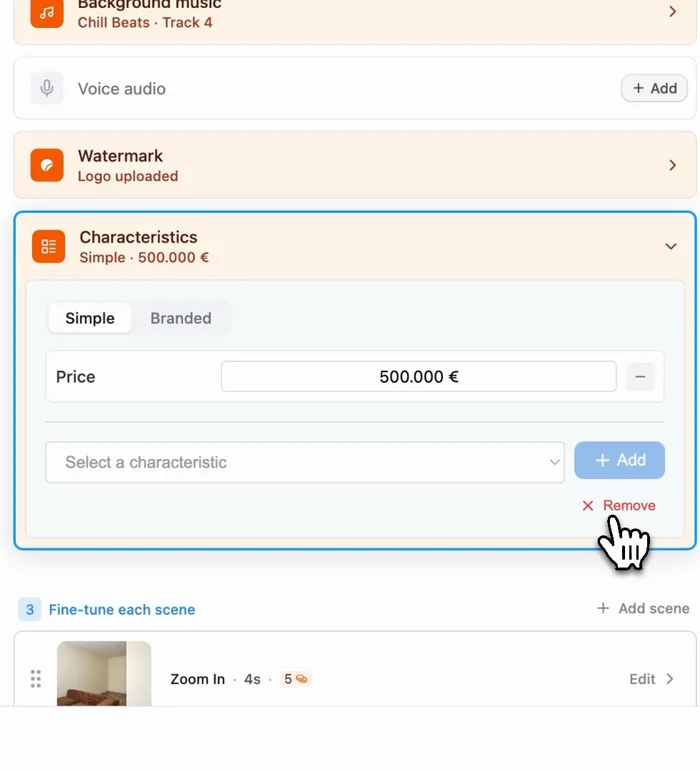
- Optionally add an AI voiceover (several languages and voices, with an AI-written script), subtitles, your agency's logo as a watermark, and property characteristics such as the price.
- Add an AI transition from the original messy room to the staged one - the people effect shows the space being furnished.
- Click Generate Video.
You get a horizontal version for portals and YouTube, and a vertical version for Instagram, TikTok and Facebook.
How long it takes and what it costs
| Step | What it fixes | Time in Pedra |
|---|---|---|
| 1. Remove the clutter | Rooms look bigger and cared for | ~45 seconds per photo, all at once |
| 2. Style one key room | The room buyers look at first | ~30 seconds per room |
| 3. Enhance and fix perspective | Light, colour, tilted walls | ~15 seconds per photo |
| 4. Create a video | The listing moves, in both formats | A few minutes |
All four steps take about 15 minutes per property. Pedra starts at 29 € per month (239 € per year), with a free trial.
Mistakes that make a listing look cheaper
- Staging every room. It looks fake and takes longer. One or two rooms are enough.
- Not labelling staged photos. Buyers feel misled at the visit. Add the caption.
- Enhancing only the cover photo. One bright photo followed by nine dark ones makes the rest look worse. Enhance all of them.
- Changing the architecture. Declutter and furnish, but don't remove walls, windows or damage that the buyer will see in person.
- Stopping at photos. Without a video, the listing still looks like every other listing on the portal. For the full set of assets a listing needs, see how to market a real estate listing.
FAQ
How do you make a listing look luxury?
A listing looks luxury because of how it is presented, not because of the property. Four things do the work - rooms without clutter, one styled room, bright light with straight lines, and a video. Most ordinary listings miss all four. Fix them and an ordinary apartment reads as a high-end listing, using the same phone photos.
Can I make a luxury listing with phone photos?
Yes. In Pedra you upload the phone photos, remove the clutter with Remove Object, furnish one key room with Furnish, run Enhance and Fix Perspective on every photo, then turn the result into a video with Create Video. No photographer, camera or professional team is needed.
How long does it take to make a listing look luxury?
About 15 minutes per property for all four steps. Enhance and Fix Perspective takes about 15 seconds per photo, removing objects about 45 seconds per photo, and furnishing a room about 30 seconds. Photos are processed at the same time, not one by one.
Should I stage every room to make a listing look expensive?
No. Stage the one or two rooms buyers look at first, usually the living room and the main bedroom. Leave the rest decluttered and enhanced, and label staged photos as virtually staged in the listing - it builds trust with buyers.
How much does it cost to make a listing look luxury with Pedra?
Pedra starts at 29 euros per month, or 239 euros per year, and there is a free trial. That covers decluttering, virtual staging, photo enhancement and the property video.
You can try all four steps free at pedra.ai, with the photos you already have.
