A real estate video script is the narration of a listing video: one opening line with the location, one short line for each scene describing what is on screen, and a closing line with what sells. At about 2.5 spoken words per second, a 30-second listing video needs around 75 words. The hard part is not the length, it is making every line land on its scene.
Writing that script often takes longer than making the video itself. You have the photos and the raw footage, then a blank page: what do you say about the kitchen, how long should each line be, what goes first? You write something, read it out loud, try to sync it with the scenes and start again. In the video below I show the faster way, with a chalet in Aravaca, Madrid.
Below: what a listing video script is (and what it isn't), the structure that works, how long each line should be, three scripts to copy, the mistakes that make a voiceover sound robotic, and how to get yours written in 30 seconds.
What a real estate video script is (and isn't)
Search for "real estate scripts" and most of what comes back is phone scripts: cold calls, expired listings, FSBO follow-ups. That is a different job. A listing video script is the voiceover of a property video. It has three constraints a phone script doesn't:
- It is tied to images. Every line plays over a specific scene, so the words have to describe what the viewer is looking at.
- It is timed. A line that is longer than its scene spills into the next room. A script that is longer than the video gets cut off.
- It is heard, not read. Short sentences, concrete words, no abbreviations like "3bd/2ba" that only work on a portal.
The listing description is the raw material, not the script. A good description (see our property description examples) has all the facts; the script picks the ones that match each scene and says them out loud.
Why your listing videos need a script
Most listing videos on Instagram and TikTok go out with music only, because nobody had time to write and record a voiceover. That costs views. A video with no voice gives the viewer no reason to keep watching, retention drops, and the platforms show it to fewer people. Fewer views means your listing, and your agency's name, reach fewer buyers.
A voiceover fixes that with three things music can't do: it names the location in the first seconds, it gives the facts buyers filter on (size, bedrooms, outdoor space), and it tells them what to do next.
The structure of a listing video script
Every script that works follows the same three parts.
1. The opening line: location plus the hook
The first 2 to 3 seconds decide if someone keeps watching. Open with where the property is and the single strongest reason to look: the pool, the views, the size, the price. "In Aravaca's Diplomáticos, discover 700 square metres of home and a private pool." Location first, because it is the first filter every buyer applies.
2. One line per scene
This is the body, and the part most scripts get wrong. Write exactly one line for each scene of the video, in the same order as the scenes, and describe what is on screen in that moment:
- Name the room and its best feature: "A bright living room with peaceful garden views."
- Use the transitions to connect rooms: "From the terrace, enter...", "then cross the central hallway."
- One idea per line. If a scene shows the kitchen, don't talk about the bedrooms yet.
3. The closing line: what sells and what's next
End with the facts that make someone call (bedrooms, size, price, a lifestyle line) and the next step: "Book a viewing", "Link in bio", or your name and agency. If the video ends on the exterior or the garden, the closing line goes there.
How long should each line be?
A natural voiceover runs at about 2.5 words per second. Use that to size every line:
| Scene length | Words per line | Example |
|---|---|---|
| 3 seconds | 6 to 8 | "A serene bedroom with a walk-in closet." |
| 4 seconds | 8 to 10 | "From the terrace, enter a bright living room with garden views." |
| 30-second video (8 to 10 scenes) | 70 to 80 in total | The three examples below |
| 60-second video | 140 to 150 in total |
Leave a short gap between lines. A voice that never pauses sounds read, not spoken.
Three real estate video script examples
Copy the structure and swap in your listing's facts.
Example 1: city flat, 30 seconds, 8 scenes
- (Facade) "In the heart of Chamberí, a renovated two-bedroom flat on a quiet street."
- (Living room) "The living room gets light all day through three balconies."
- (Kitchen) "An open kitchen, fully fitted, ready to move in."
- (Dining area) "Room for six at the table, next to the windows."
- (Main bedroom) "A main bedroom with built-in wardrobes."
- (Second bedroom) "A second bedroom for guests or a home office."
- (Bathroom) "A new bathroom with a walk-in shower."
- (Street) "Seventy square metres, two minutes from the metro. Book your viewing today."
Example 2: family house with a pool, 37 seconds, 12 scenes
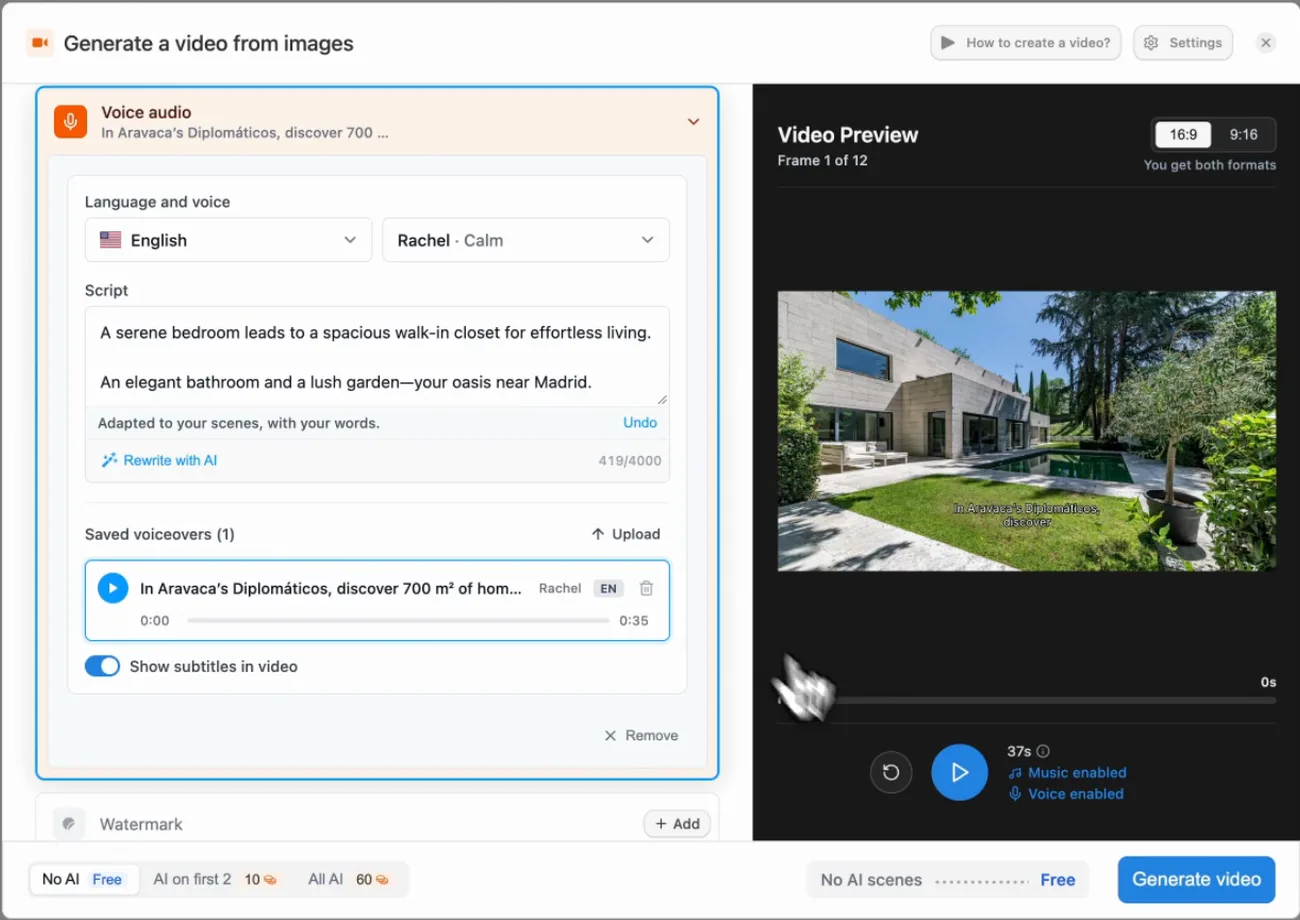
This is the script Pedra wrote for the Aravaca chalet in the video above, from the listing description:
- (Pool, facade) "In Aravaca's Diplomáticos, discover 700 square metres of home and a private pool."
- (Garden, living room) "From the terrace, enter a bright living room with peaceful garden views."
- (Dining room, kitchen) "Dine beside the kitchen with calming views of the garden beyond."
- (Office, hallway) "Work in the tranquil office, then cross the bright central hallway."
- (Bedroom, walk-in closet) "A serene bedroom leads to a spacious walk-in closet for effortless living."
- (Bathroom and garden) "An elegant bathroom and a lush garden, your oasis near Madrid."
Six lines for twelve scenes: each line covers the two rooms on screen while it plays, and the voice never talks about a room the viewer can't see.
Example 3: short reel for Instagram, 15 seconds, 5 scenes
- (Best photo) "Sea views from every room. Here's why."
- (Terrace) "A 20 square metre terrace facing south."
- (Living room) "Open plan, with the view in the middle of it."
- (Bedroom) "Wake up to the sea."
- (Exterior) "Three bedrooms in Altea. Link in bio."
For more reel hooks, see real estate reels that get views.
Mistakes that make a voiceover sound robotic
- Pasting the listing description as the script. Descriptions are written to be read. Read out loud, they run too long and don't follow the order of the scenes.
- One paragraph for the whole video. Without a line per scene, the voice drifts: it talks about the kitchen over the bedroom.
- Too many numbers in one line. "3 bedrooms, 2 bathrooms, 120 m², 2 parking spaces" is a spec sheet. Give one number per line.
- No pauses. Back-to-back lines with no breath sound like a machine, even when a person reads them.
- A script longer than the video. The last line gets cut, and that's usually the one with the call to action.
How to get a real estate video script written in 30 seconds
Writing the lines is the part that takes time. In Pedra it takes about 30 seconds of your time, because the script is written from your listing description and cut to the scenes of the video automatically.
1. Create the video from your listing photos
Open the property in Pedra, click Create video and select the photos. Pedra proposes an order for the scenes; you can drag them to change it.
2. Open Voice audio and pick the voice
In Voice audio, choose the language and the voice (in the video I use English and Rachel). You can also clone your own voice once and use it in every video.
3. Paste the listing description and click Adapt to my scenes
Paste the description from your listing, the same text you have on the portal, and click Adapt to my scenes.
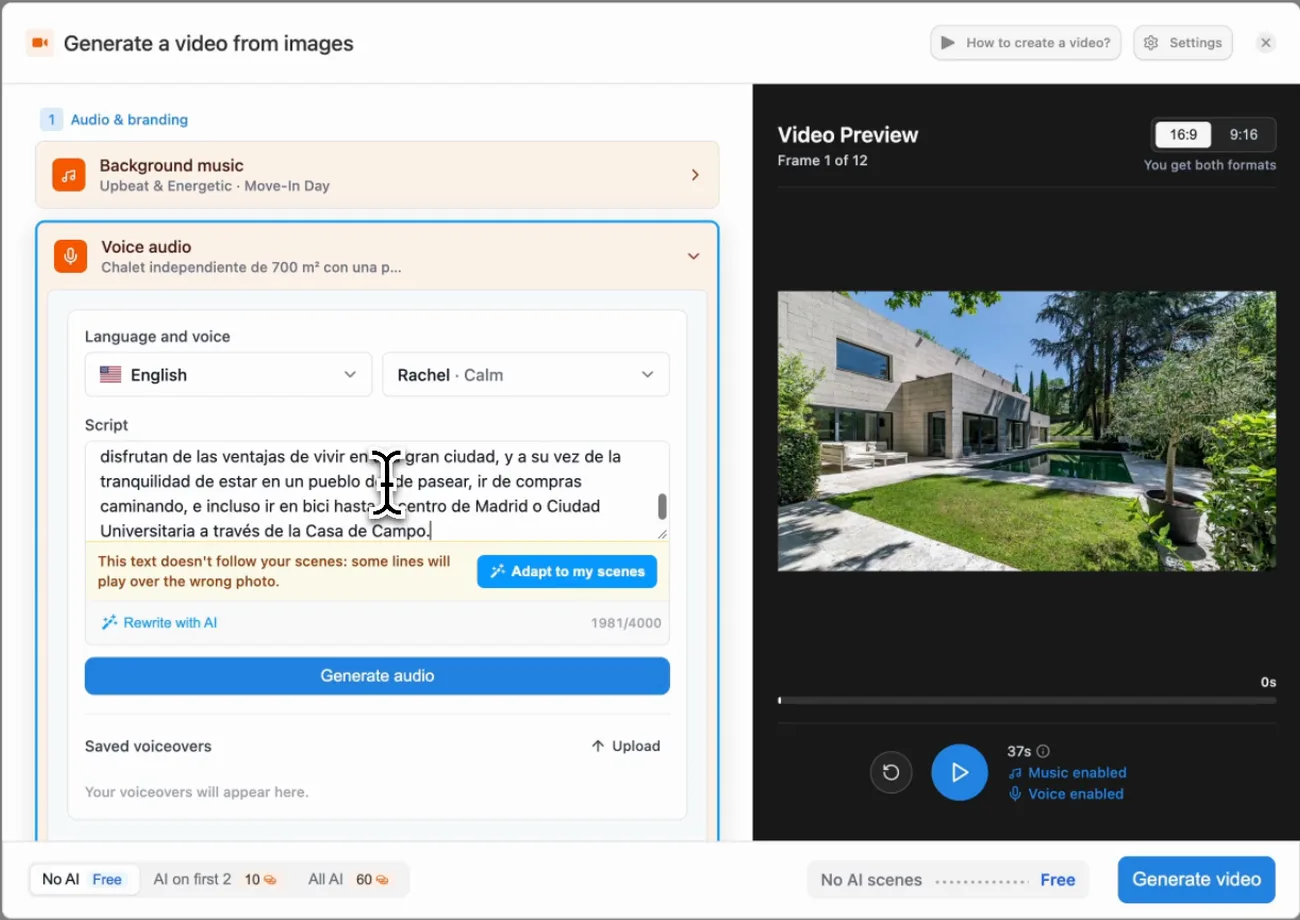
Pedra rewrites the description into one line per scene, so each line fits the seconds its scene is on screen and talks about what's in it. It opens with the location and closes with what sells. Don't like a line? Edit it like normal text.
4. Generate the video
Click Generate video. Rendering takes about 2 to 5 minutes, and you get a horizontal (16:9) and a vertical (9:16) version, with the voiceover and subtitles synced to every scene.
What it costs
Writing the script and generating the AI voiceover don't use credits. You only spend credits on scenes you animate with AI (5 credits per scene); scenes with the free zoom effects cost nothing. On the Pro plan, 100 credits cost 29 euros a month. See the full video options on the video for real estate page.
Frequently asked questions
What should a real estate video script include?
An opening line with the location and the one thing that makes the listing stand out, one short line for each scene describing what is on screen, and a closing line with what sells (bedrooms, size, price or the lifestyle) and how to book a viewing.
How long should a real estate video script be?
As long as the video, and no longer. A voiceover runs at about 2.5 words per second, so a 30-second listing video needs around 70 to 80 words, and each scene of 3 to 4 seconds gets one line of 8 to 10 words.
Can AI write a real estate video script?
Yes. Pedra writes the script from your listing description and the photos in the video: you paste the description, click Adapt to my scenes, and you get one line per scene that matches what is on screen, narrated by an AI voice or your own cloned voice.
Should a listing video have a voiceover or only music?
A voiceover. A music-only video gives the viewer nothing to hold on to, so fewer people watch it to the end and social platforms show it to fewer people. A voice that names the location, the size and the best rooms keeps buyers watching.
How do I sync the voiceover with the scenes?
Write one line per scene and keep each line shorter than its scene. If you do it by hand, read each line out loud with a timer. In Pedra the script is cut into scenes for you, so the voice talks about the pool while the pool is on screen.
For the rest of the video (shooting, editing, where to post it), read how to make real estate videos that sell.