
TL;DR
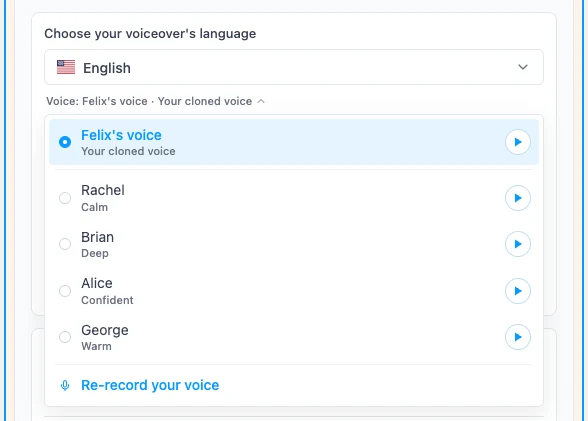
Your property videos can now be narrated in your own voice. Open the voice list in Pedra, click Clone your voice, read a short text out loud for about a minute, and your voice appears in the list next to the stock narrators. It works in all 8 voiceover languages.
Why your own voice
A stock narrator is fine, but every agent using it sounds the same. Your voice is part of your brand: it's what your clients hear on the phone and at viewings. Now it's also what they hear on your listing videos, without you having to record a voiceover for every property.
How it works
- In the video editor, open Voice audio and click the voice under the language selector.
- At the bottom of the list, click Clone your voice.
- Click Start recording and read the text on screen. It's a short property walkthrough written in your voiceover language, so the clone learns how you sound when you present a home.
- Name your voice, tick the consent box and click Clone my voice.
A few seconds later you hear your clone read a property sentence. Click Use this voice and you're done.
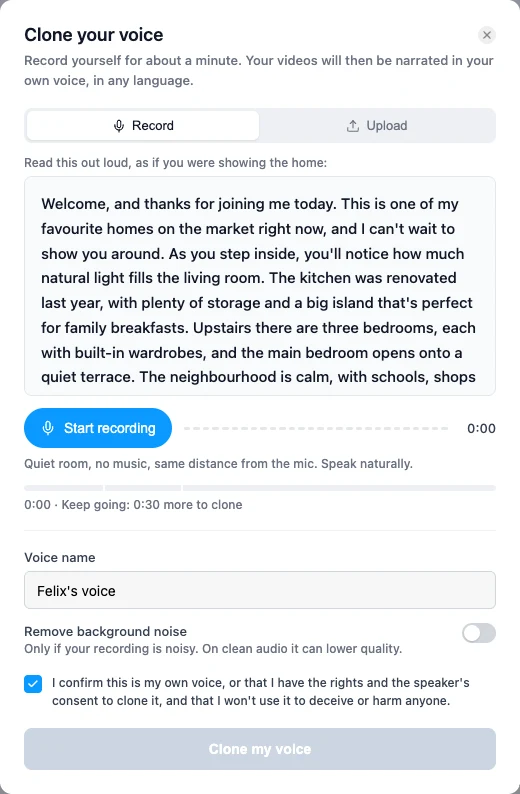
Prefer to use a recording you already have? Switch to Upload and drop in clips of you speaking (MP3, WAV or M4A). Just you, no music.
One voice, 8 languages
Your clone isn't tied to the language you recorded in. Pick English, Spanish, French, German, Portuguese, Italian, Dutch or Polish, and your voice reads the script in that language, with your own accent. Handy if you sell to international buyers.
Good to know
- Quality: a quiet room and a natural tone matter more than the microphone. Your laptop mic is enough.
- Price: cloning is free on paid plans. Each voiceover costs 1 credit, like any other voice.
- One clone per account: recording again replaces the previous one. You can delete it at any time from the voice list.
- Consent: only clone your own voice, or a voice you have permission to use.
Try it
Open a property in Pedra, go to Video, expand Voice audio and click the voice name. Clone your voice is at the bottom of the list.
Step by step guide: how to clone your voice for real estate video voiceovers.
