
How to Make a Real Estate Video with ChatGPT or Claude
Can ChatGPT or Claude make a real estate video? Yes, with the Pedra plugin. Step-by-step guide with the exact prompts, voice-over, subtitles and a real example.
On their own, ChatGPT and Claude can't make a real estate video. They can write the script, but they can't turn your listing photos into a finished video with music and a voice-over.
With the Pedra plugin they can. You connect your Pedra account once, then ask in plain words: "make a listing video from these photos, day to night on the house, a voice-over with subtitles, and show 4 bedrooms and 180 m²". ChatGPT or Claude sends the request to Pedra, and Pedra renders the video.
This is the video we made for this guide. Every setting in it came from a single prompt in the chat.
It opens on the house going from day to night, moves to the terrace going from day to sunset, and then walks through the living room, kitchen and bedroom. The narration is burned in as subtitles, and the bedroom, bathroom and surface counts stay on screen.
What you need
- A Pedra account. Video uses your Pedra credits, the same as in the app.
- ChatGPT or Claude. The Pedra plugin works in both.
- Your listing photos. 5 to 10 photos is enough. For a day to night or sunset transition, you need both versions of the photo. You can make the night or sunset version in Pedra first (see how to make a day to night real estate video).
Step 1: Add the Pedra plugin
In ChatGPT
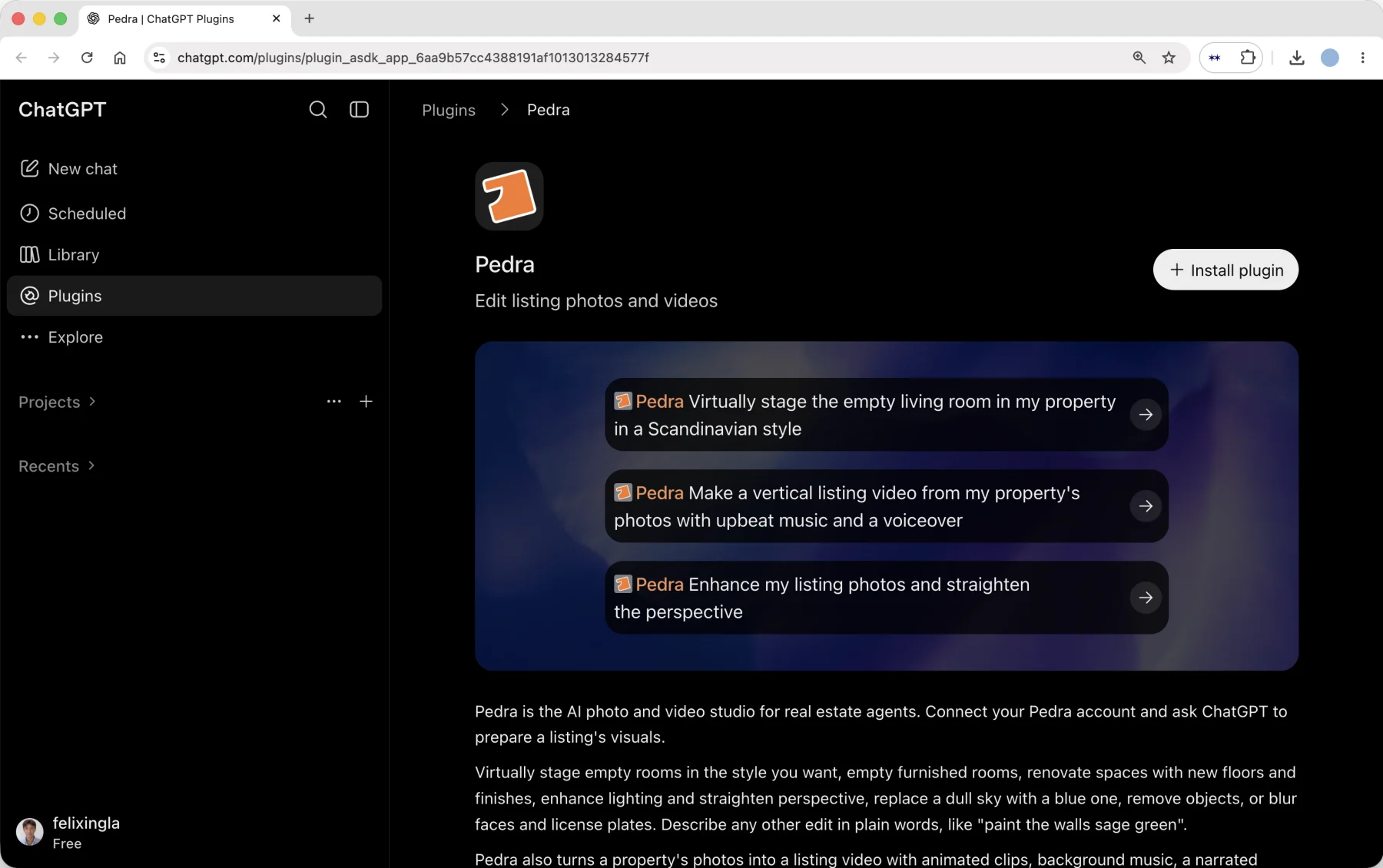
Open Plugins in the ChatGPT sidebar, search for Pedra, and click Install plugin. ChatGPT asks you to sign in to Pedra once and approve access.
In Claude
Open Settings → Connectors → Add custom connector, paste this URL and click Connect:
https://app.pedra.ai/mcp
You sign in to Pedra once and approve access. There's no API key to copy. It works in Claude on web, desktop and mobile. More detail in the Pedra MCP docs.
Step 2: Put your photos in a Pedra property
ChatGPT and Claude can't pass a photo you paste in the chat on to a plugin, so the photos need to live in Pedra. Ask:
Create a Pedra property called "Villa with terrace, 4 bedrooms".
You get back a link to the new property. Open it and drag your photos in. If the listing is already in Pedra, skip this step and just tell the assistant which property to use.
Step 3: Ask for the video
This is the prompt we used for the video above:
Make a horizontal listing video from the photos in "Villa with terrace, 4 bedrooms". Show the exteriors first, starting with the house. Use a sky transition from day to night on the house and from day to sunset on the terrace. Then the living room, the kitchen and the bedroom. Show 4 bedrooms, 1 bathroom and 180 m². Add an English voice-over with subtitles and cinematic music.
You don't need to write the voice-over yourself. Pedra's AI looks at the photos, writes a short script from what it sees and the details you gave, and records the narration. Give your photos clear names (for example "house day" and "house night") so the assistant pairs the right ones for each sky transition.
A few things you can change in the same prompt:
- Format: "horizontal" for portals, YouTube and your website, "vertical" for Instagram Reels, TikTok and Stories.
- Effect per photo: zoom in, zoom out, static, a sky transition (day to night or day to sunset on the same shot), or a transition between two different photos.
- Details on screen: bedrooms, bathrooms, surface, rooms, price, location, parking, heating and outdoor space.
- Voice: 8 languages (English, Spanish, French, German, Portuguese, Italian, Dutch and Polish), each with 4 native voices. Ask for "a warm British male voice" or "a calm Spanish female voice".
- Music: acoustic, chill, cinematic, electronic or upbeat.
Step 4: Get the video
Rendering takes 3 to 10 minutes. The assistant tells you it's rendering, and you can keep chatting. When you want it, ask:
Is the video ready?
You get a download link, and the video is also saved to the property's Videos tab in Pedra, where you can still edit it in the app.
Step 5: Make the vertical version
For Reels and TikTok, ask for the same video in vertical:
Now make the same video in vertical for Instagram Reels.
More prompts to try
- "Make the same video with a Spanish voice-over for our Madrid buyers."
- "Redo the video but put the kitchen before the living room."
- "Make a vertical video with upbeat music and no voice-over."
- "Stage the empty living room in a Scandinavian style, then use it in the video."
The last one works because the plugin does more than video. It can also stage empty rooms, empty furnished ones, enhance photos and fix the sky. See how to create virtual home staging.
Frequently asked questions
Can ChatGPT make a real estate video?
Not on its own. ChatGPT can write a script, but it can't turn listing photos into a video. With the Pedra plugin installed, it can: you describe the video in the chat and Pedra renders it with transitions, music, voice-over, subtitles and property details.
Can Claude make videos?
Claude doesn't generate video on its own. With the Pedra connector, Claude can make real estate listing videos from your property photos, in horizontal or vertical format.
Is the Pedra plugin free?
Installing the plugin is free. Making videos and edits uses the credits on your Pedra account, the same as making them in the Pedra app. See pricing.
Can I upload photos straight into the chat?
Not yet. ChatGPT and Claude don't pass images from the chat on to plugins. Put the photos in a Pedra property (Step 2), and the assistant picks them up from there.
How long does the video take?
3 to 10 minutes. You can keep working in the chat while it renders.
Can I edit the video afterwards?
Yes. Ask the assistant to change it in the chat, or open the property's Videos tab in Pedra and edit it in the app.
Is it the same video as the Pedra app?
Yes. The plugin uses the same video engine as the app, so you get the same effects, music, voices and property details. If you'd rather click than type, see how to make a real estate video with AI.
Related help articles
- How to make a real estate video with AI
- How to make a day to night real estate video
- How to make a before-and-after home staging video
Contact
Questions or stuck on a step? Email felix@pedra.ai or call +34 621 332 701. Response within one business day, usually faster.
